Introducing Child Management - A new way to store stats for your children

Tagged:  

Children are a huge part of TomorrowsPro. They are the reason most people create their accounts in the first place. We're debuting a new Child Management feature today that will simplify the way parents use TomorrowsPro for their children.

Each parent can use their own account under their name and yet still have complete control of their child's account from theirs. Under "Personal Settings", navigate over to "Child Management". Add your child with first and last name so coaches can add them to teams if they want.

Once you have your child added to your account, you can switch over to their account and back as needed. You will also receive any e-mail sent to them so you don't have to set up another e-mail address for them.

As your children age and you think they are ready to manage their account on their own, there are also options to pass the account over to their e-mail address.

Start using this feature and setup your children on your account today!

New Web Site Redesign

Tagged:  

As you may have noticed, TomorrowsPro has received a well overdue face lift. Not only has this redesign improved the look and feel of the site, but it has also restructured the site to make it much easier to update in the future. This will allow us to build more features into the site in a shorter time period.

On a side note...If you are using TomorrowsPro with Internet Explorer 6 or Internet Explorer 7, you may experience some issues. We strongly encourage you to download a new browser like Google Chrome. This is the browser that our developers use while developing so it's definitely our most supported browser. TomorrowsPro will load faster in Chrome than any other browser. If you don't want to use Chrome, no worries...we also test the site in Internet Explorer 8, Internet Explorer 9, Firefox, and Safari.

Secure Login now Mandatory

Tagged:  

With security causing lots of problems for other companies lately, we decided to stop everything and work on security. We modified our login and registration to only work over a secure connection. This will automatically encrypt all of your passwords as you submit forms around the site.

If you run into any issues with these new changes, please e-mail our support team at support@tomorrowspro.com.

What Facebook information do we access?

When you join your Facebook account to your TomorrowsPro account, we have to access some of your information to provide you with an account. Here is a list of all fields we request and why we need them:

  • Name - It just wouldn't be any fun if team rosters said "Player 1", "Player 2", etc.
  • E-mail Address - Team and stat updates are e-mailed to you so you know what is going on with your teams. This also acts as your login if you decided to start logging in with TomorrowsPro credentials instead of your Facebook username/password.
  • Birthday - TomorrowsPro restricts some of our younger users from sharing too much so we need your birthday to do that.
  • Profile Picture - We show your profile picture next to your name on the "Friends" page. Only your Facebook friends on TomorrowsPro can see your picture. Your picture can also be seen in the top bar when you are logged in with your Facebook account.
  • Profile Link - Anywhere we put your profile picture, we link it to your profile.

That's it! We have no use for any other data so we don't access it. I want everyone to feel safe sharing their data with their friends on TomorrowsPro. If for some reason you feel like something on the web site isn't safe, please e-mail our support team immediately and we will investigate.

Updates to the Facebook Integration

The Facebook Integration has gone through a ton of changes over the past few days. Since these updates have been made, the integration is more stable and easier to use than ever before. The changes were necessary because Facebook made changes to their platform...

Facebook no longer supports:

  • Profile Boxes
  • Profile Tabs
  • The version of Facebook Connect that TomorrowsPro was using

As a result of these changes, the profile boxes and profile tabs will no longer be available from TomorrowsPro. These types of integrations worked great because you could show your stats to others without having them sign up for another application. If there was a way to build your stats into Facebook so your friends could see them without connecting to TomorrowsPro, we would have built it. Since that doesn't exist, we have enhanced the way the TomorrowsPro web site uses Facebook and built stat sharing with your Facebook friends into the site.

The changes that were made were enhancements to the Login/Registration process and the "Friends" page.

Registration/Join your Facebook Account to your TomorrowsPro Account

Whether you are a new member wishing to use your Facebook credentials to join TomorrowsPro or you are an existing member who would like to join their Facebook account to their TomorrowsPro account to enabled Facebook sharing, the process is the same.

Navigate to TomorrowsPro.com in your browser and click the Facebook Login button.
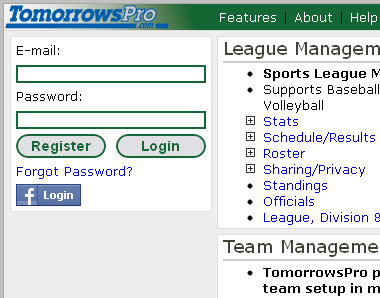
A Facebook login window will appear. Type in your Facebook credentials and click "Login"
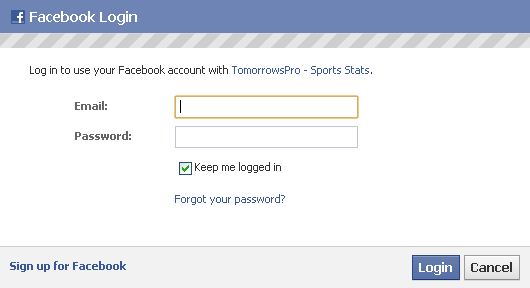
If you have already connected your Facebook Account to your TomorrowsPro account, you will be logged into TomorrowsPro at this point.

If you haven't connected your accounts yet, you will notice that the Facebook login button has become a Facebook Register button. Click on this button.
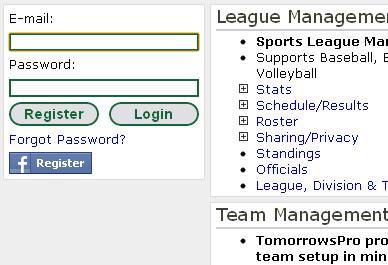
This Facebook Register button will bring you to the TomorrowsPro Register page. Fill in the Facebook form at the top of the page and submit. By using your confirmed Facebook e-mail address, you will not have to confirm your address again. Also, if your main Facebook e-mail address matches your Primary or Secondary TomorrowsPro e-mail addresses, we will link your Facebook account to your existing TomorrowsPro account. If we can't find a match, we will create a new account for you. (Add a Secondary E-mail Address to Your Account)

Friends Page
The friends page has been around on TomorrowsPro for a while, but now we have improved it. Since TomorrowsPro doesn't allow you to connect or be friends with other members of TomorrowsPro, we have setup a way to share stats with your Facebook friends only.

Your friends page will list all of your Facebook friends who have:

  • Connected their Facebook account to TomorrowsPro
  • Set their Sharing options to share seasons with Facebook
  • If these two conditions are met and you are currently logged into TomorrowsPro with your Facebook credentials, you will see which friends have updated their stats recently as well as all of the stats they are sharing with their friends.

Syndicate content